Posts

Django Form: Adding html text to help_text in FormField or ModelField

Today I come across the requirement to have a link inside the help_text for ModelField. Hence I found this simple and fast solution and would like to share with you all. Before: my_field = models.CharField(max_length=10, help_text='Simple help text here') Solution: from django.utils.safestring import mark_safe my_field = models.CharField(max_length=10, help_text= mark_safe ('Simple help text here. <p>HTML code here</p>')) That's it and your help text will have this html code in place. Happy Coding!
DJango Queryset comparing date time

Good day to all developers. Today encountered this issue where I do a simple queryset in DJango and hit with the following warning message:   RuntimeWarning: DateTimeField MessageContent.send_time received a naive datetime (2014-05-14 04:46:30.392000) while time zone support is active. How is this happen? This is due to I do the following datetime comparison in my queryset: import datetime Item.objects.filter(created = datetime.datetime.now()) The error is due to TIME_ZONE (in settings.py) is enabled by default. So the solution for this is pretty simple: 1) Either to set the TIME_ZONE to False in settings.py ( this will take away the timezone capability of your application) 2) or by comparing to timezone enabled datetime which the code as below: import datetime from django.utils.timezone import utc now = datetime.datetime.utcnow().replace(tzinfo=utc) Item.objects.filter(created = now) With this, the problem has been solved. More informati...

Django Form: MultipleChoiceField and How To Have Choices From Model Example

Image
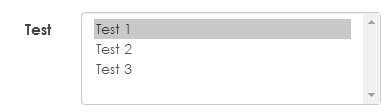
Its been long time after my last post. During my development in Django, I encountered this issue, where I don't know how to assign tuple value to choice argument in Django MultipleChoiceField. So here I would like to share on how to do this. Here are some information on the environment for this code: Django 1.6.1 doc: https://docs.djangoproject.com/en/1.6/ref/forms/fields/#multiplechoicefield Then looks into the forms.py: #1 import the models which use for MultipleChoiceField from TestChoice.models import Test #2 create a static CHOICES variable to hole this tuple, you can perform any normal Django query here. TEST_CHOICES = [[x.id, x.name] for x in Test.objects.all()] #3 If you would like to add extra choices, then you can do the following: TEST_CHOICES.insert(0, ['', "Empty"]) #4 The form field should looks like below, (required=False, only if you want this field to be optional) class TestForm(forms.Form):     test= forms.MultipleChoiceField...

JQuery attr function to replace image src not working in browsers except Chrome

Hi all, As per title, I believe there are a lot people who face this problem when want to dynamically update an image using JQuery. Once there is a requirement for this, the first thing come out in mind is the .attr() function provided by JQuery. The code roughly will be like this: $('#<image element id>').attr('src',<new image source>); Logically this should be done the job. However, after a test in several browsers, one will find out that this only working in Chrome. Internet Explorer, Firefox and Safari do not perform as expected. Why will this happen? It is due to cache issue. The solution for this issue is very simple. It is just needed to append a timestamp behind the new image source to trick the browser that the image is a new one for each time the function is triggered. It is as below: $('#<image element id>').attr('src', <new image source> ?' + new Date().getTime() ); * the part highlighted in yellow is ...

How to enter single user mode in CentOS

I'm facing this issue where I forgot about my root password in CentOS. Hence after look around, I found out that entering single user mode able to let me login as root user and then change the password for it. :) The step is very easy, Press any key when booting up CentOS to enter interactive mode Instead of choosing any of the bootable OS, type 'a' Go to the end of line, put a 'space' and then enter 'single' then press enter Now you will login as root user :) Enjoy

Line height not working for text in button (only in Firefox)

Found this interesting bug when I was trying to position a text inside a button or input submit. This only happen in Firefox browser. After searching online, found the solution from below website, http://www.cssnewbie.com/input-button-line-height-bug/#.US7N129BMQ4 (credit to Rob Glazebrook for the clear explanation and workaround ). Hope the findings can help others who face the same problem. :)

FTP BAT Script Doesn't work. Goes in a LOOP by itself

There is time where bat file created and when run, it keep looping the command inside. After a while, found out that, the file name is the problem. Never ever create a .bat file with the following name: ftp.bat Happy coding. :)